

You use Linux, whether you know it or not

Linux powers most of the internet’s servers and is the underlying platform for most cloud infrastructure

The power of many

  • Community driven ecosystem
  • Open-source projects
  • Experience the world of Linux
Server rack with blinking green lights
cable network

Choice

  • 100’s of different distributions
  • Endless customization
  • Perfect for beginners and experts

“Linux is the operating system of choice for anyone who wants to use a computer for something other than running Microsoft Office.”

– Unknown

Watch, Read, Listen


  • I’ve always been fascinated by the fact that with an open-source operating system every facet is available for anyone to look at. Ideally that means that if there are any issues someone will find it. Flaws aren’t hidden away. That being said even the most meticulously reviewed software can have hidden flaws and it takes something unexpected to uncover them. Enter Claude Mythos AI, the cutting-edge artificial intelligence that recently made headlines by discovering a Linux bug that had gone unnoticed for an astonishing 27 years.

    In testing out Claude Mythos AI the team decided to use it to try and see if it could identify vulnerabilities in complex software systems autonomously. Running by itself overnight Mythos was able to find and exploit dozens of active vulnerabilities that were previously uncovered. In this case while AI was looking over OpenBSD’s TCP stack, something that had been reviewed many times over the years it found a flaw that could be used by an attacker..

    This bug, which had evaded detection for nearly three decades, meant that two maliciously crafted packets could cause the server to crash.

    The discovery was a testament to the power of AI in cybersecurity and a look at how security is going to change in the future. While human engineers and security experts had reviewed OpenBSD over the years, the complexity of modern software has always made it challenging to catch every bug. Claude Mythos AI, with its ability to process vast amounts of data and identify patterns that might elude human eyes has shown that things are likely going to change rapidly.

    As AI continues to evolve we are likely going to be looking at a time when lots of previously unnoticed bugs will be rapidly uncovered. Software companies are going to really be on top of it or their customers are going to suffer or we are going to see lots a of major data leaks. As with any powerful tool like this, it is not only the good guys that have access. While Mythos is currently being kept under wraps by Anthropic while they try to work with companies to upgrade their security first, the cat is already out of the bag.

    For me it doesn’t change anything about how I feel about open source solutions, I think it is always going to be better for everyone when everything is out in the open, available to be reviewed by anyone or anything. While there may be some growing pains as there is a rush to cover up bugs found by AI we will hopefully all end up in a much better, much more secure place.


  • EXT 4, Btrfs? XFS? Ring a bell? If you are a Linux expert then you know what I mean. If you don’t, then you are in the right place. These are just Linux file systems. And to simplify it further, it’s how the OS organizes, stores, and retrieves data on a disk. 

    Linux File Systems

    Why Linux File Systems Feel Overwhelming (But Aren’t)

    Many Linux newcomers usually freeze up at the partitioning screen. Unlike Windows that gives you the NTFS option, Linux gives you an entire menu to choose from. However, this is where the Linux OS power is. 

    The Types of Linux File Systems You Actually Need to Know

    The list below is the shortlist of the types of linux file systems worth your attention:

    • EXT4: This file system is reliable, fast, stable, and default in most distros. I highly recommend it for beginners.
    • Btrfs: This is a modem file system is for snapshots, compression, self-healing. 
    • XFS: This file system is built for performance at scale and is great for large files and high-throughput workloads.
    • F2FS: This file system is built for flash storage. If you’re running Linux on an SSD or SD card, pay attention to this one.
    • ZFS: This file system is powerful and excellent for NAS setups and data integrity freaks.

    Linux File Systems for Windows Users

    If you are switching to Linux from Windows, then Linux file systems for windows compatibility is your first headache. This what you must know:

    • Windows cannot natively read EXT4 and you’ll need tools like Ext2Fsd or DiskGenius.
    • exFAT and FAT32 are your best friends for cross-platform USB drives.
    • If you dual-boot, mount your NTFS partitions in Linux because it handles them beautifully.

    Choosing the Right File System Without Losing Your Mind

    Before you format anything, ask yourself: 

    1. What are you storing? Large media files love XFS. Snapshots and backups love Btrfs.
    2. Are you dual-booting? Stick with EXT4 for Linux, NTFS for Windows.
    3. Is this a server or a desktop? Servers deserve ZFS or XFS. Desktops are fine with EXT4 or Btrfs.

    Own Your File System Choice

    Linux file systems are not a puzzle you need to solve and forget. This is a decision that depends on how you use the OS. Everytime you change the reason you use the OS, you’ll need to select a file system that supports your new processes. 

    To open the conversation, what file system are you running right now? Drop your setup in the comment section below.


  • Every user usually dreads Linux updates at some point in their learning journeys. The force behind this fear is not understanding them. However, Linux updates are one of the best in their entire ecosystem. 

    Linux Updates

    The Update System That Actually Respects You

    Linux updates give you total control. You are free to decide what updates, when, and why. 

    Key advantages of Linux Updates

    • Updates are transparent, you see exactly what’s changing
    • Rollbacks are possible on most modern distros
    • No forced restarts mid-workflow

    I have never seen any scenario where Linux updated my system without my permission at 2AM like some other OS usually do. 

    Linux updates vs Windows Updates

    The Linux updates vs Windows updates is a debate that should end already. Windows usually surprises users with their updates, and most of which you never asked for. Linux on the other hand provides them as a well-labelled menu. 

    Why Linux wins this debate:

    • Linux gives you granular control allowing you to either update just your kernel, apps, or everything at once
    • In Linux, there is no telemetry bundled in, your update isn’t also a data grab
    • Most Linux updates complete in under two minutes

    How to Install Linux Updates Without Breaking Anything

    Follow these golden rules to install Linux updates safely:

    1. Always read the changelog before a major version bump
    2. Update regularly, avoid letting packages stack up
    3. Use LTS releases if stability is your priority
    4. Snapshot first on critical machines 

    Embedded Linux Updates

    Embedded Linux updates (updates running on routers, IoT devices, and industrial devices) should not be overlooked. Because the update stack is open and scriptable, engineers can deploy surgical, minimal updates to resource-constrained devices without bloat.

    You can manage fleets of thousands of embedded devices using just a simple shell script and a solid package repo. Now this is why Linux updates truly shine. You can’t get this kind of power in proprietary ecosystems.

    Embracing Linux Updates

    Don’t be afraid of Linux updates. Use them as your competitive advantage and leverage. Once you truly master Linux, you’ll realize that the system was built for humans who want transparency. 

    So, next time you hesitate before running the Linux update, read the release notes. Just be curious and learn more. What’s your update horror story or success story?


  • One truth nobody tells you upfront is that Linux for beginners is now more accessible than before. Nowadays, you don’t need to memorize commands or be a programmer. All you need to master Linux is to have a willingness to learn. 

    Why So Many Beginners Are Afraid to Learn Linux for Beginners

    Fear is the one weapon that kills many Linux journeys before the start. Many beginners fear Linux because of: 

    • Outdated myths about needing to code everything
    • Horror stories from the early 2000s that no longer apply today
    • Imposter syndrome and thinking Linux is only for experts

    These are just misconceptions that don’t apply today. Modern Linux distros are polished, intuitive, and user-friendly. 

    Linux for Beginners

    How to Learn Linux for Beginners Without Losing Your Mind

    For newcomers, one advice I can give is using Linux daily. You actually learn more by using the OS. 

    As a beginner, follow these tips:

    • Install a beginner-friendly distro on a spare machine or virtual box
    • Use it as your daily driver for one week
    • Google errors as they come, that is the curriculum

    Use these resources to simplify and ease your journey: 

    • YouTube channels like LearnLinuxTV
    • Linux Foundation’s intro courses
    • Communities like r/linux4noobs on reddit

    The Best Version of Linux for Beginners (My Honest Take)

    These are the best version of Linux for beginners:

    • Linux Mint 
    • Ubuntu 
    • Zorin OS 

    Personally, I highly recommend Linux Mint. It just works, and just works matters enormously when you’re starting out.

    What You’ll Gain the Moment You Commit to Linux

    Once you are committed to learning Linux for beginners, you will stop being a passive user and start understanding how your machine actually works. 

    Committing to using it daily, you’ll notice: 

    • Faster boot times and snappier performance
    • No bloatware, no forced updates at midnight
    • A growing confidence with technology that carries into everything

    Final Verdict

    To be honest, within the first month of using Linux you’ll reach a point where you just want to quit. However, this phase will pass and you’ll reach the other side and start experiencing computing like you actually own it. Linux for beginners is a perfect place to start. 

    So, what are you waiting for? What’s actually holding you back from making the switch? Let me know in the comment section about your biggest Linux fear.


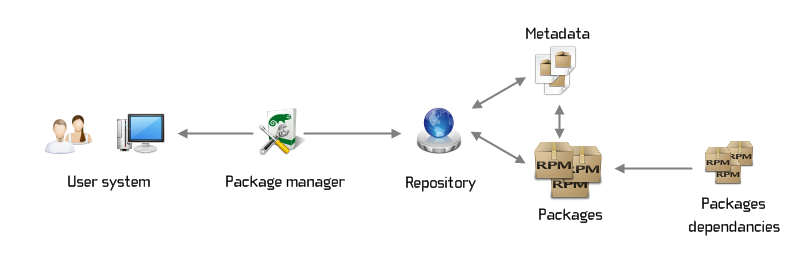
  • Linux package management is the backbone of every Linux system. To get the most out of your system, you must first understand how to use it. If you are new to Linux, Linux package management is a tool for installing, updating, and removing software from the OS. The tool automatically fixes any dependencies, ensuring everything works perfectly together. 

    Linux Package Management

    Why Most Linux Users Struggle With Package Management

    A mistake that many beginners using Linux make is treating the package manager like a vending machine. They just type commands blindly and hope for the best. They forget what you feed into the system, is what you’ll get out of the system, resulting in:

    • Unresolved dependencies that spiral into chaos
    • Mixed package sources that break system stability
    • Manual installs that create orphaned packages nobody tracks

    Once you start treating your Linux package management system as a living, breathing part of your OS, you will start experiencing success in your projects. You will start building systems that actually work. 

    The Linux Package Management Commands You Actually Need

    One way to waste your time is trying to compile software from source without understanding repositories. The following Linux package management commands are worth memorizing:

    • apt install / apt update / apt upgrade—For Debian/Ubuntu users, this is your daily driver
    • dnf install / dnf upgrade—This is the modern standard for Fedora/RHEL
    • pacman -Syu—Arch Linux’s elegant, rolling-release powerhouse
    • snap install / flatpak install—Universal formats, cross-distro compatibility

    A valuable tip: Always run a system update before you install new packages. 

    The Hidden Key is Understanding Repositories

    A package manager pulls software from repositories—curated, trusted sources. Avoid adding third-party PPAs or repos to prevent destabilizing your system. Stick to official repos. Only add extras once you understand tradeoffs associated with those. 

    The Best Linux Package Management Tools Right Now

    These are examples of the best modern linux package management tools:

    • Flatpak—Sandboxed, universal, excellent for desktop apps
    • Snap—Canonical’s answer to cross-distro packaging
    • Homebrew on Linux—Yes, it works. Yes, it’s genuinely useful
    • Nix—Steep learning curve, but reproducible builds are magic

    Stop Fighting the Package Manager

    Mastering Linux package management is what will make you productive on Linux faster. Before you start branching out, first master your distro’s native tools. Read man pages, understand repositories, and purposely break a VM just to fix it. This is how you will move from a frustrated tinkerer to someone who actually trusts their system. 

    As usual, I want to know what your go-to package management set up. Let me know in the comment section below.


  • After I see a Windows machine get infected by ransomware, the third time in a year, I lose my sympathy and begin to feel vindicated. Linux vs Windows security is not a mere talk to me but the very reason why I made the switch and never looked back. 

    In simple terms: Linux is better designed to be more secure than Windows and in the case of desktop users who appreciate control and privacy, there is no real competition.

    Linux vs Windows Security

    Why Linux vs Windows Security Is Not Even Close

    I have used several Linux distributors, including Ubuntu, Arch, Fedora, among others. One thing that was consistent across these platforms is that I was never, even once, attacked by malware. Behind this is the Linux permission model. In this model, each process runs with the least privilege necessary, keeping you protected from malware and ransomware attacks. 

    Key security advantages Linux holds:

    • No system-wide changes without explicit sudo authorization
    • Open-source code detects and patches  vulnerabilities quickly
    • A fragmented ecosystem makes mass malware campaigns impractical

    Windows is built on the basis of convenience first, security second. This legacy is what makes it easier for malware to attack windows-based systems. 

    Linux vs Windows Security Comparison

    I have a colleague who is a Windows only geek. So, I explained to him Linux’s security model and he was surprised when I mentioned file permissions. 

    Windows systems run countless background services which have elevated privileges by default. Linux is the opposite of this. The attack surface on a well-configured Linux desktop is dramatically smaller. If you read through all the published Linux vs Windows security comparison content, Linux wins consistently on: 

    • Kernel patch response time
    • User privilege separation
    • Transparency of system processes

    Linux vs Windows Security, Stability & Performance

    Security and stability are siblings. A system that doesn’t crash doesn’t expose exploitable states.

    I’ve run Linux servers with 900+ day uptimes, no reboots, no surprise patch restarts. Windows forces restarts at the worst moments, sometimes mid-session. This instability is both annoying and a security risk. 

    On the Linux vs Windows security stability performance front, Linux also wins on resource efficiency. Leaner systems mean fewer background processes, which means fewer vectors for attack.

    Linux vs Windows Security for Desktop Users

    One argument I hear consistently is that Linux is not user-friendly. But honestly, in 2026 this is not true. This is a common misconception. 

    For desktop users, Linux offers:

    • Full-disk encryption that’s trivial to set up
    • No telemetry harvesting your usage data by default
    • Package managers that update everything 

    The Linux vs Windows security for desktop users argument used to be about usability trade-offs. But today, it’s about your willingness to learn. 

    Final Verdict

    To be bluntly true, if you value your system’s security Linux is a must-have system. Linux offers more protection to malware and ransomware than Windows ever could. And with the permission model, your safety is guaranteed. 

    What do you think? Drop your real experience when it comes to Linux vs Windows security in the comment section below.


  • The day I realized that I can use my tools to build, instead of always fighting with them, is the day I ditched Windows for Linux. When you start utilizing Linux fully, you stop facing cryptic PATH errors and waiting on slow packager managers. You stop wondering why your code worked on your machine but broke down in production. Linux for developers is the most powerful, flexible, and efficient operating system you can choose. Here is why. 

    The Real Advantages of Linux for Developers

    The following are the advantages of Linux for developers

    • Native terminal experience — Bash, Zsh, and your entire Unix toolchain work as intended, no emulation layers needed
    • Package managers that don’t fight you — apt, pacman, dnf: install in seconds, not minutes
    • Stability under pressure — I’ve had Linux servers run for 400+ days without a reboot. Try that on Windows
    • Full system transparency — You own your machine. Every config, every process, every log is yours to inspect

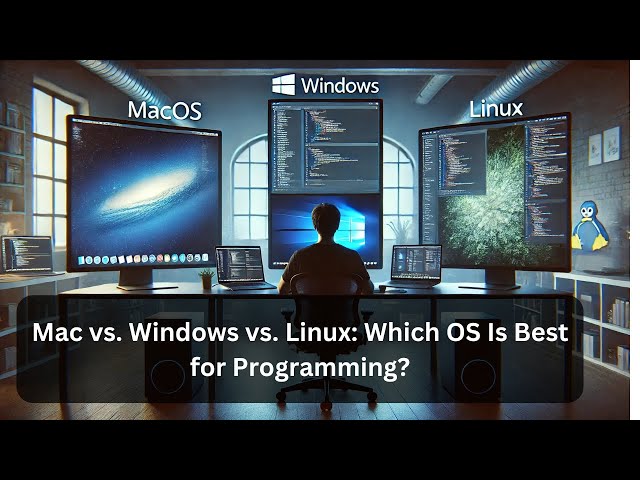
    Mac vs Windows vs Linux for Developers: An Honest Take

    Mac vs Windows vs Linux for Developers

    I have used Windows, Mac and Linux professionally. This is my honest and humble opinion on the three OS. 

    1. macOS

    The Unix foundation in macOS makes it more polished. However, on this platform you are locked into Apple’s hardware pricing and their closed ecosystem. 

    2. Windows OS

    Windows now has WSL2 which is impressive. However, it’s still a workaround. You’re bolting Linux onto Windows, which tells you everything you need to know.

    3. Linux OS 

    Linux is the native home of tools developers actually use, such as Docker, Git, Vim, SSH, compilers. For many developers, Linux is home for code. 

    Finding the Best Linux for Developers

    Not all Linux distros function the same way. To choose the best Linux for developers, use your workflow as a guiding point:

    • Ubuntu/Pop!_OS is best for beginners and those who want stability without fuss
    • Fedora comes with cutting-edge packages, great for those who want modern toolchains
    • Arch Linux guarantees maximum control and requires maximum learning
    • Debian is the right choice if you want something that simply runs without surprises

    When choosing Linux for developers, start where you are comfortable. Then start using the more complex systems to advance your skills. 

    Why I’ll Never Go Back

    I learned how software and operating systems actually work when I started using Linux. And because of it, I became a better developer. Each error I made forced me to understand the system beneath the code. If you care about your tools, speed, and independence, Linux is your answer.

    As usual, the comment section is open. Let me know what you think about Linux for developers and how it compares to other tools.


  • Many operating systems, such as Windows, and Mac OS, give you a complete system. They give you a box and you live in it. Linux OS, on the other hand, gives you parts, allowing you to build whatever you want. Linux customizations are crucial in ensuring you get a system that meets your daily needs. 

    Linux customizations are both my hobby and obsession. With Linux, I can modify every layer of the system, from the desktop environment down to the kernel parameters, to match exactly how I work. Linux allows me to have unfiltered control without vendor lock-in. 

    Amazing Linux Customization

    The Frustration That Started It All

    Before switching to Linux, I was a big Windows user. What made me switch to Linux is the inability of modifying my taskbar further without relying on a third party hack. But the transition process wasn’t smooth. In the first week, I faced broken drivers and a hostile terminal. When I resized my panel and swapped the window manager, I felt ownership of the OS. I hadn’t experienced this feeling before. 

    Everyone who makes this jump, experiences this frustration. And this is the exact pain point Linux customization solves. 

    Why Arch Linux Customization Hits Different

    Before finally landing on one Linux OS, I did a lot of distro-hoping. And I can tell you that there is nothing that compares to Arch Linux customization. With this OS, you have a blank canvas with nothing installed. You have to build it from scratch. 

    Why I keep coming back to Arch Linux:

    • You understand every package because you chose it
    • Rolling releases mean you’re always current
    • The AUR (Arch User Repository) has practically everything
    • Your setup is yours, nobody else’s

    The big advantage of this setup is that when anything breaks, you know how to fix it because you built it up. 

    The Best Linux Customization Tools in My Arsenal

    These are the Linux customization tools I rely on: 

    • i3wm / Hyprland for tiling window managers that eliminate mouse dependency
    • Rofi which is a blazing-fast application launcher
    • Polybar / Waybar for fully scriptable status bars
    • Picom is lightweight compositor for transparency and animations
    • Neovim + custom dotfiles my editor, my rules

    Exploring Linux Customization Options Beyond the Desktop

    Many people think that Linux customizations stop at wallpapers and themes. This is a misconception. Linux customization options go much deeper: 

    • Shell customization: Zsh with Powerlevel10k or Fish for intelligent prompts
    • Boot splash screens: Plymouth themes for a polished startup
    • Font rendering: Infinality patches for crisp typography
    • Kernel tweaks: Custom schedulers for gaming or low-latency audio

    With each layer you customize, you learn more about your system and how it actually works. This gives you ownership of the system, making you get the most out of the software. 

    Linux Customization Final Verdict

    Through Linux customization, I moved from being a passive user into someone who genuinely understands my machine to the core. I now own my system. The customization process is not an easy journey though. However, once you master it, you get a self-tailored system with extensive capabilities that a stock OS cannot offer. 

    My question to you is, what’s one customization you made that changed how you use Linux? Comment below.


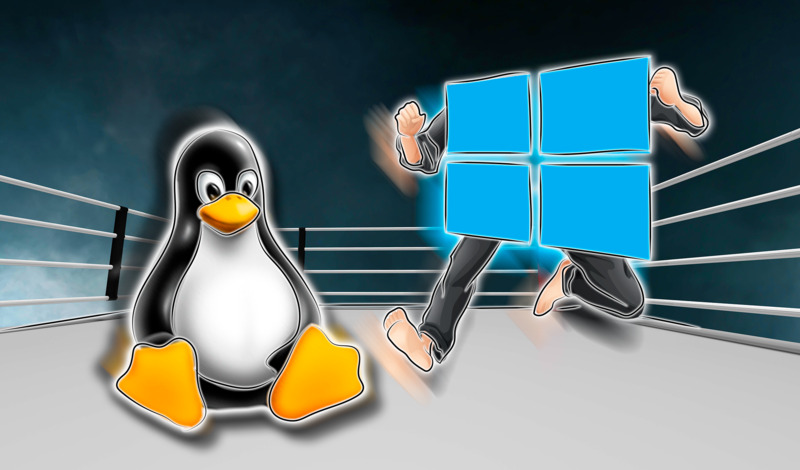
  • The Linux vs Windows gaming debate has been going on for several years now. In this article, I am joining this debate and give you my honest reviews.

    Red Dead Redemption 2 on Linux Vs Windows Gaming Performance

    So, Where Does Linux Actually Stand in Gaming Today?

    Windows still holds a measurable performance edge in most gaming titles when compared to Linux. However, with Linux’s Valve Proton compatibility layer, Linux is slowly catching up. 

    Linux vs Windows Gaming Key facts:

    • Most Steam titles now run on Linux via Proton
    • Native Linux games still represent a minority of the library
    • Anti-cheat support remains the single biggest barrier

    Linux vs Windows Gaming Performance

    I recently did my own informal Linux vs Windows gaming benchmarks on the same machine. The results were not something I expected. My expectations were that Windows will hold a large advantage over Linux. I found out the opposite. 

    Windows pulled 10% to 15% ahead on open-world titles like Cyberpunk 2077. However, on source engine games, there were negligible differences, and in certain instances, Linux edged ahead. 

    What affects gaming performance most:

    • GPU driver maturity (NVIDIA on Linux is still complicated)
    • Whether the game runs natively or through Proton
    • Your kernel version and scheduler settings

    Linux vs Windows Gaming FPS

    You can notice the Linux vs Windows gaming FPS gap in this gaming titles:

    • AAA titles with heavy DX12 features Windows wins cleanly here
    • Older or indie titles Linux holds its ground confidently here
    • Esports titles with kernel-level anti-cheat Linux can’t even launch them

    Why I Still Game on Linux Anyway

    I prefer gaming on Linux because: 

    • There are no forced updates mid-session
    • There is a cleaner system, less background bloat
    • Wayland + Gamescope is genuinely impressive for HDR and refresh rate handling
    • The community support is some of the best I’ve encountered anywhere in tech

    My Final Take on Linux vs Windows Gaming

    In the Linux vs Windows gaming performance, Windows wins cleanly here. But let me just say Linux is not so far behind. It’s a credible platform to use if your library doesn’t depend on titles with invasive anti-cheat.

    Switch to Linux for gaming if you value privacy and system control. However, don’t switch if competitive FPS is your life. 

    Let me get some feedback from you. Are you gaming on Linux full-time, or does Windows still have you locked in? Drop your experience in the comments. Let’s argue about it properly.


  • In the computing life, one decision that you will have to make is changing your operating system (OS), especially switching to Linux. I have been using Linux for years now, and it’s one of the best decisions I ever made. I have also seen many people quitting back to Windows on the second day of installing Linux. No one prepared them about any potential challenges they will face after switching their OS. 

    Switching to Linux from Windows 11

    What Switching to Linux Actually Means for Windows Users

    Switching to Linux from Windows involves a shift in Philosophy. It means you are trading: 

    • Convenience for control 
    • Hand-holding for freedom 

    Switching to Linux is 20% technical and 80% mental. That’s why there are many people who quit Linux on the second day, without giving it a proper run. 

    When switching to Linux, here’s what you’re actually signing up for:

    • Learning a new way to install software
    • Occasionally troubleshooting drivers, especially on laptops
    • Discovering that most of your Windows software has a perfectly good Linux alternative

    Is Switching to Linux Worth It? My Honest Take

    Is switching to linux worth it? Yes it’s worth it. But not for everyone. 

    The first time I tried to compile a Wi-Fi driver at midnight on a deadline, I nearly threw my laptop out the window. This frustration taught me more about how computers work than ten years of clicking through Windows dialogs ever did.

    Switch to Linux if:

    • You value privacy and want to escape Microsoft’s telemetry
    • Your hardware is older and Windows feels bloated on it
    • You’re a developer, student, or anyone who lives in the terminal

    Wait before switching if:

    • You rely heavily on Adobe Creative Suite or specific Windows-only games
    • You’re not comfortable Googling error messages (yet)

    The Biggest Mistakes Windows Users Make When Switching to Linux

    There is a pattern I have noticed in people switching to Linux from Windows. They research on Reddit the best Linux distro and many people recommend Arch Linux. They install the software, and after two or three days, they uninstall it and go back to Windows. 

    My advice:

    • Start with Linux Mint or Ubuntu which are beginner-friendly with massive support communities
    • Dual-boot first without deleting your Windows to give yourself a safety net.
    • Use the terminal daily, even for small things to build muscle memory

    Should You Make the Switch to Linux?

    If you are asking yourself this question, it means you are ready to switch to Linux. Currently, distros are polished, hardware support has improved massively and the Linux community is welcoming (mostly). 

    What I can advise new Linux users is to commit fully. Half-heartedness kills more Linux journeys than any driver issue ever will.

    Have you switched from Windows to Linux? Or are you still thinking about it? Drop your experience in the comments below. I want to know more about your journey.

Join 2+ subscribers

Stay in the loop with everything you need to know about Linux